
Iget Vapes
how to recharge iget bar pro
Jan
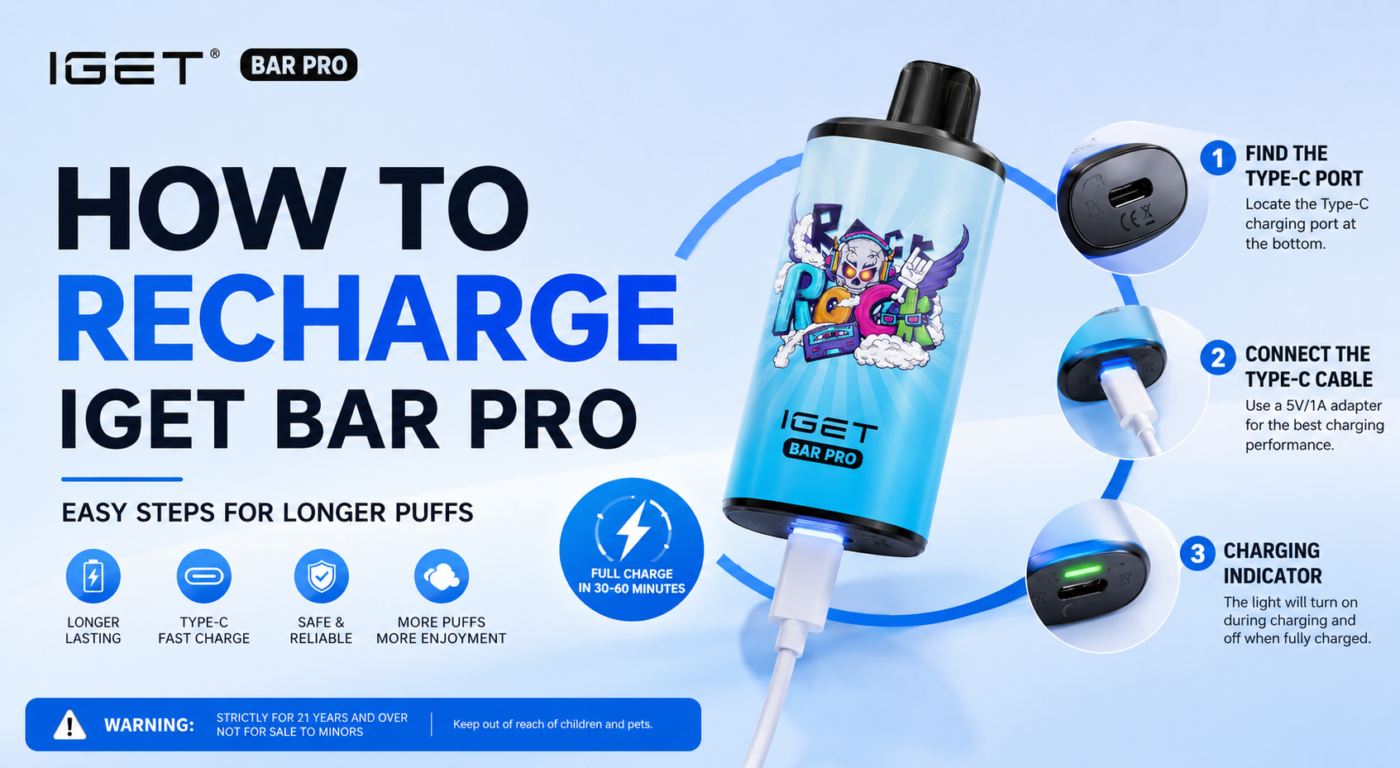
How to Recharge an iGet Bar Pro: A Complete Step-by-Step Guide Disposable and rechargeable vape devices have become increasingly popular because of their convenience and ease of use. Among these, the iGet Bar Pro stands out for its sleek design, satisfying performance, and rechargeable battery that helps users get the most from the e-liquid inside the device. If you’re new to using the iGet Bar Pro or simply want to make sure you’re charging it correctly, this guide will walk you through everything you need to know. From identifying when your device needs charging to proper charging techniques and battery care tips, you’ll learn how to keep your iGet Bar Pro performing at its best. Is the iGet Bar Pro Rechargeable? Yes. Unlike traditional disposable vapes that are discarded once the battery runs out, the iGet Bar Pro includes a rechargeable battery. This allows you to recharge the device multiple times until the e-liquid has been completely used. Recharging ensures you can enjoy every last puff without wasting e-liquid simply because the battery has become depleted. Signs Your iGet Bar Pro Needs Charging Before connecting your device to a charger, it’s helpful to recognize the common signs of a low battery. These may include: Reduced vapor production Weaker flavor or throat hit The LED indicator blinking repeatedly The device not activating when you inhale Noticeably lower performance than usual If you experience one or more of these symptoms, your battery likely needs a recharge. What You’ll Need Charging your iGet Bar Pro is simple. Before you begin, gather the following: A compatible USB charging cable (the correct connector depends on your specific model) A reliable USB power source, such as a computer USB port or a quality wall adapter A clean, dry charging area Using high-quality charging accessories helps protect your battery and can improve its overall lifespan. How to Recharge an iGet Bar Pro Follow these simple steps to safely recharge your device. Step 1: Locate the Charging Port Look at the bottom of your iGet Bar Pro for the charging port. Depending on the version you own, it may use a USB Type-C connector or another compatible charging interface. Inspect the port to ensure it is free from dust, lint, or debris before connecting the cable. Step 2: Connect the Charging Cable Insert the charging cable gently into the charging port. Avoid forcing the connector into place, as this could damage both the cable and the charging port. Step 3: Plug Into a Power Source Connect the other end of the cable to a suitable USB power source. Recommended options include: A laptop or desktop computer A certified USB wall adapter A reputable USB charging hub Avoid using damaged chargers or excessively powerful charging adapters that may not be suitable for small rechargeable devices. Step 4: Wait for the Device to Charge Most iGet Bar Pro devices require approximately 30 to 60 minutes to reach a full charge, although charging times may vary depending on the battery level and power source. During charging, the LED light may illuminate or blink to indicate that charging is in progress. Once fully charged, the light may change color or turn off, depending on the model. Step 5: Disconnect the Charger After charging is complete, unplug the cable from both the power source and the device. Your iGet Bar Pro is now ready to use again. Charging Safety Tips Following proper charging practices helps maintain battery health and reduces unnecessary wear. Here are several important safety tips: Use the recommended charging cable whenever possible. Do not leave the device charging overnight. Charge on a flat, non-flammable surface. Keep the device away from water or excessive moisture. Avoid exposing the battery to direct sunlight or extreme temperatures. Never use a damaged charging cable. Taking these precautions helps keep your device operating safely. How Long Does the Battery Last? Battery life varies depending on your vaping habits. Factors that influence battery performance include: Frequency of use Puff duration Ambient temperature Battery age Light users may only need to recharge every few days, while heavier users may recharge more frequently. Fortunately, the rechargeable design allows you to continue using the remaining e-liquid without replacing the device simply because the battery is empty. Tips to Extend Battery Life Proper battery care can help maximize performance over time. Here are a few simple habits to adopt: Avoid Complete Battery Drain Recharge your device before the battery becomes completely depleted whenever possible. Lithium-ion batteries generally perform better when they are not repeatedly discharged to zero. Unplug After Charging Once fully charged, disconnect the charger instead of leaving the device plugged in for extended periods. Store Properly If you won’t be using the device for a while, store it in a cool, dry location away from direct sunlight. Keep the Charging Port Clean Dust and lint can interfere with charging. Occasionally inspect the charging port and gently remove debris using a soft brush or compressed air if needed. Troubleshooting Charging Problems If your iGet Bar Pro isn’t charging, try the following solutions. Check the Charging Cable A faulty cable is one of the most common causes of charging issues. Try using another compatible cable to determine whether the original cable is defective. Inspect the Charging Port Look for dirt, pocket lint, or visible damage that could prevent a proper connection. Test Another Power Source Try charging from a different USB port or wall adapter. Sometimes the issue lies with the power source rather than the device itself. Allow Time If the battery has been completely drained, it may take several minutes before charging indicators appear. Stop Using a Damaged Device If the device becomes unusually hot, emits an unusual smell, shows signs of swelling, or has visible damage, discontinue use immediately. Damaged lithium-ion batteries can pose a safety risk and should not be charged. Frequently Asked Questions Can I use my phone charger? You can generally use a standard USB power adapter if it provides appropriate power for the device. Avoid using damaged or unverified charging accessories. How often should I recharge the iGet Bar Pro? Recharge whenever you notice declining battery performance or the low-battery indicator appears. Can I overcharge the device? Many modern rechargeable devices include charging protection, but it’s still good practice to unplug the device once charging is complete. Why isn’t my vape producing vapor after charging? If the battery is fully charged but no vapor is produced, the e-liquid may be depleted or the device may have reached the end of its usable life. Final Thoughts Recharging your iGet Bar Pro is a quick and straightforward process that helps you get the most from every device. By using the correct charging cable, following safe charging practices, and maintaining the battery properly, you can enjoy consistent performance until the e-liquid is fully consumed. Regular maintenance, careful charging, and proper storage can also help extend battery life and ensure a better overall vaping experience. Whenever you notice reduced performance, simply recharge the device, unplug it once it’s full, and continue enjoying smooth, satisfying use.
